Showing posts with label Web Developing. Show all posts

Monday, July 25, 2016

Filter Data From DataBase Using PHP on Page

Filter Data From DataBase Using PHP on Page


<?php
if
(isset($_POST['search']))
{
   
$ValueSearch = $_POST['value'];
   
$query = "SELECT * FROM `inventory` WHERE CONCAT(`item_number`, `make`, `model`, `price`, `quantity`) LIKE '%".$ValueSearch."%'";
   
$SearchResult = filterTable($query);
}
else{
   
$query = "SELECT * FROM `inventory`";
   
$SearchResult = filterTable($query);
}
function filterTable($query){
   
$username="root";
   
$password=null;
   
$database="pich";
   
$connect = mysqli_connect("localhost",$username,$password,$database);
   
$filter_Result = mysqli_query($connect, $query);
   
return $filter_Result;
}
?>
<!doctype html>
<
html>
<
head>
    <
title>Filter and Search using PHP&HTML</title>
    <
style>
       
table,tr,th,td
       
{
           
border: 1px solid black ;
        }
    </
style>
</
head>
<
body>
<
form action='Exercise_Php_C.php' method='POST'>
    Please Select a make:

    <select name='value'>

        <option value=''>All</option>

        <option value='Yamaha'>Yamaha</option>

        <option value='Matin'>Matin</option>

        <option value='Washborn'>Washborn</option>

        <option value='Fender'>Fender</option>

        <option Value='Honda'>Honda</option></select><br><br>

    <input type='submit' name='search' value='Search'><br><br>
           <hr>
    <table>

        <tr>

            <th>Item Number</th>

            <th>Make</th>

            <th>Model</th>

            <th>Price</th>

            <th>Quantity</th>

        </tr>

        <?php while ($row = mysqli_fetch_array($SearchResult)):?>

            <tr>

                <td><?php echo $row['item_number'];?></td>

                <td><?php echo $row['make'];?></td>

                <td><?php echo $row['model'];?></td>

                <td><?php echo $row['price'];?></td>

                <td><?php echo $row['quantity'];?></td>

            </tr>

        <?php endwhile; ?>

    </table>

</form>

</body>

</html>


You can go to get more information about this code by click here: https://youtu.be/hCny9MtpUSk
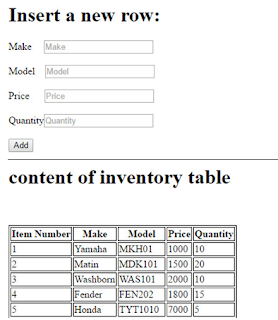
Add data into database from Form using PHP

Add data into database from Form using PHP

Code:

<?php

//PHP insert new Record

if(isset($_POST['add'])){

    try{

        $PDOConnect = new PDO("mysql:host=localhost;dbname=pich","root","");

    } catch (PDOException $exc){

        echo $exc->getMessage();

        exit();

    }

    $make = $_POST['make'];

    $model = $_POST['model'];

    $price = $_POST['price'];

    $quantity = $_POST['quantity'];


    $PDOQuery = "INSERT INTO `inventory`(`make`, `model`, `price`, `quantity`) VALUES (:make,:model,:price,:quantity)";

    $PDOResult = $PDOConnect->prepare($PDOQuery);

    $PDOExecute = $PDOResult->execute(array(":make"=>$make,":model"=>$model,":price"=>$price,"quantity"=>$quantity));


    if($PDOExecute){

        echo 'Successfully inserted data into invetory table';

    }else{

        echo 'data Not Inserted';

    }

}

//end insert


//Display Table information

if(isset($_POST['add']))

{

    $query = "SELECT * FROM `inventory` WHERE CONCAT(`item_number`, `make`, `model`, `price`, `quantity`)";

    $SearchResult = filterTable($query);

}

else{

    $query = "SELECT * FROM `inventory`";

    $SearchResult = filterTable($query);

}

function filterTable($query){

    $username="root";

    $password=null;

    $database="pich";

    $connect = mysqli_connect("localhost",$username,$password,$database);

    $FilterResult = mysqli_query($connect, $query);

    return $FilterResult;

}

//end Table Display

?>


<!doctype html>

<html>

<head>

    <title>Insert Record Using PHP Code</title>

    <meta charset="UTF-8">

    <meta name="viewport" content="width=device-width, initial-scale=1.0">

    <style>

        table,tr,th,td

        {

            border: 1px solid black ;

        }

    </style>

</head>

<body>

<form action="Exercise_Pph_D.php" method="post">

    <h1>Insert a new row: </h1>

    Make&nbsp;&nbsp;&nbsp;&nbsp;&nbsp;<input type="text" name="make" required placeholder="Make" ><br><br>

    Model&nbsp;&nbsp;&nbsp;&nbsp;<input type="text" name="model" required placeholder="Model" ><br><br>

    Price&nbsp;&nbsp;&nbsp;&nbsp;&nbsp;&nbsp;<input type="number" name="price" required placeholder="Price"> <br><br>

    Quantity<input type="number" name="quantity" required placeholder="Quantity"> <br><br>

    <input type="submit" name="add" value="Add">
    <hr>


    <table>

        <h1>content of inventory table</h1>

        <tr>

            <th>Item Number</th>

            <th>Make</th>

            <th>Model</th>

            <th>Price</th>

            <th>Quantity</th>

        </tr><br><br>


        <?php while ($row = mysqli_fetch_array($SearchResult)):?>

            <tr>

                <td><?php echo $row['item_number'];?></td>

                <td><?php echo $row['make'];?></td>

                <td><?php echo $row['model'];?></td>

                <td><?php echo $row['price'];?></td>

                <td><?php echo $row['quantity'];?></td>

            </tr>

        <?php endwhile; ?>

    </table>

</form>

</body>

</html>


You can go to get more education of above this code by click on here: https://youtu.be/uMxaAdP3LrM